smartlockmarket.com

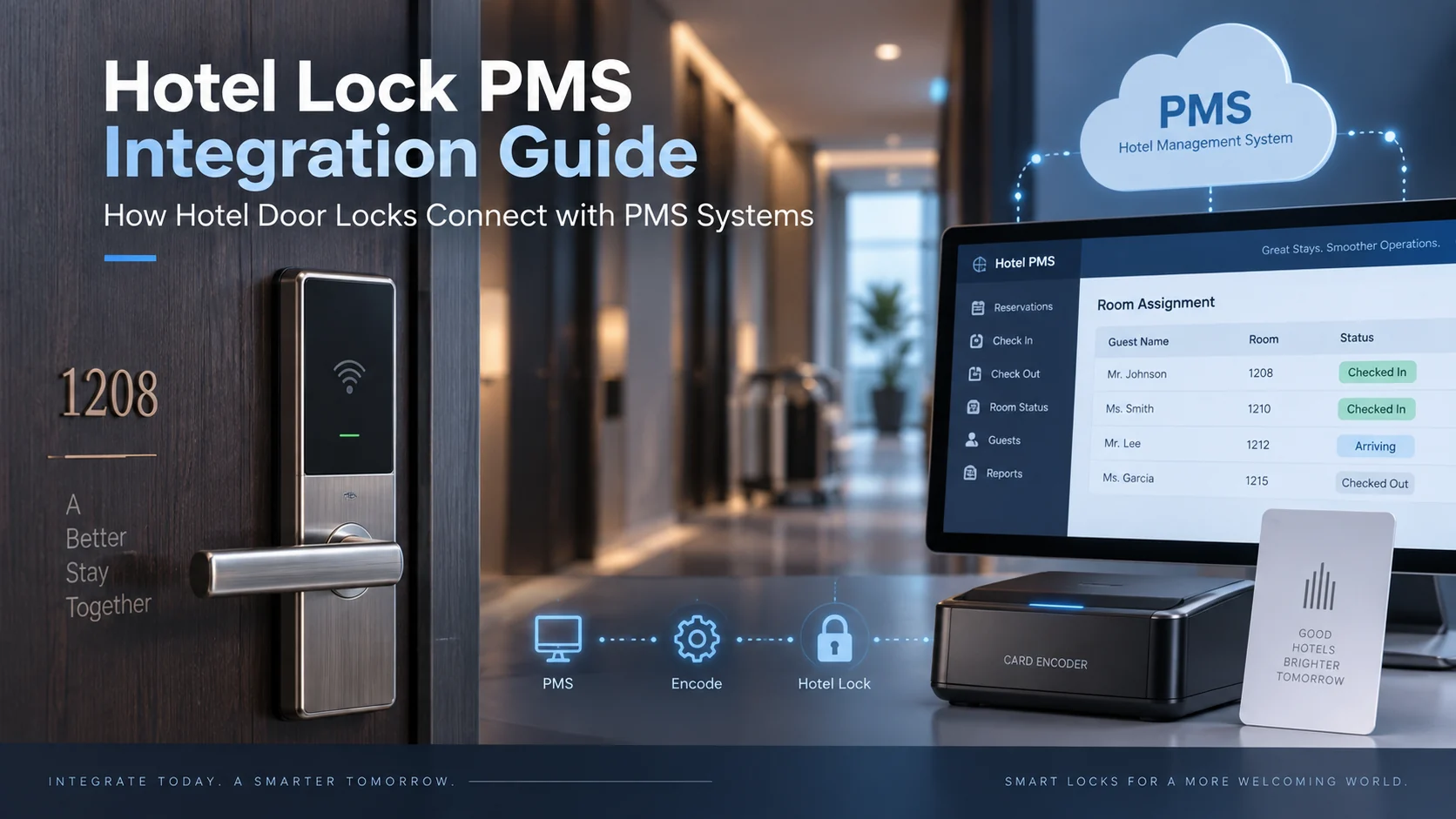
Hotel Lock PMS Integration Guide: How Hotel Door Locks Connect with PMS Systems
For hotel projects, choosing the right door lock is only one part of the access-control decision. The hotel lock system also needs to work with the property’s operational workflow, especially when the hotel uses a PMS (Property Management System) for reservations, check-in, room assignment, and guest management.
This guide explains how hotel lock PMS integration typically works, what information the hotel IT team or PMS provider needs, and what should be confirmed with the lock supplier before a project moves forward. It is written for hotel owners, project contractors, system integrators, distributors, and procurement teams evaluating a complete hotel lock solution.
SmartLockMarket supplies hotel RFID locks, hotel keypad locks, lock management software, card encoders, RFID cards, and project support for B2B hotel and serviced-apartment projects.
Table of Contents
9
What Is Hotel Lock PMS Integration?
A PMS manages hotel operations such as reservations, guest records, room status, check-in, and check-out. A hotel lock management system controls room-access credentials, such as RFID cards or PIN codes.
PMS integration allows these two systems to exchange the information required for front-desk operations. For example, when a guest checks in, the PMS can pass room and stay information to the hotel lock software so that a valid room key can be issued for the correct room and date range.
The exact workflow depends on the PMS platform, hotel lock software, and interface method. This is why integration should always be confirmed project by project rather than assumed from the lock model alone.
Hotels use many different PMS platforms. Widely deployed options include Oracle Opera and Opera Cloud, and cloud-native systems such as Mews and Cloudbeds, alongside many regional and property-specific solutions. The lock system does not need to support every PMS brand in advance; the key question is whether the specific PMS version in use can implement the interface method provided by the lock system. Compatibility should therefore be confirmed for each project rather than assumed from a brand name alone.
Main Components in a Hotel Lock System
A typical hotel RFID lock project may include the following components:
- Hotel RFID door locks installed on guest-room doors.
- Hotel lock management software used to manage rooms, users, access permissions, and card issuance.
- Card encoder connected to the front-desk computer for issuing guest and staff cards.
- RFID cards for guest-room access and, where applicable, other hotel functions.
- Energy-saving switches that may use the same or compatible card technology.
- PMS interface that transfers the required data between the hotel PMS and the lock system.
For a complete overview of the hardware and project structure, see our Hotel Lock Solutions page and Hotel RFID Locks category.
How PMS Integration Usually Works
In a standard project, the PMS remains responsible for hotel operations, while the lock software remains responsible for access control. The integration layer passes the required information between them.
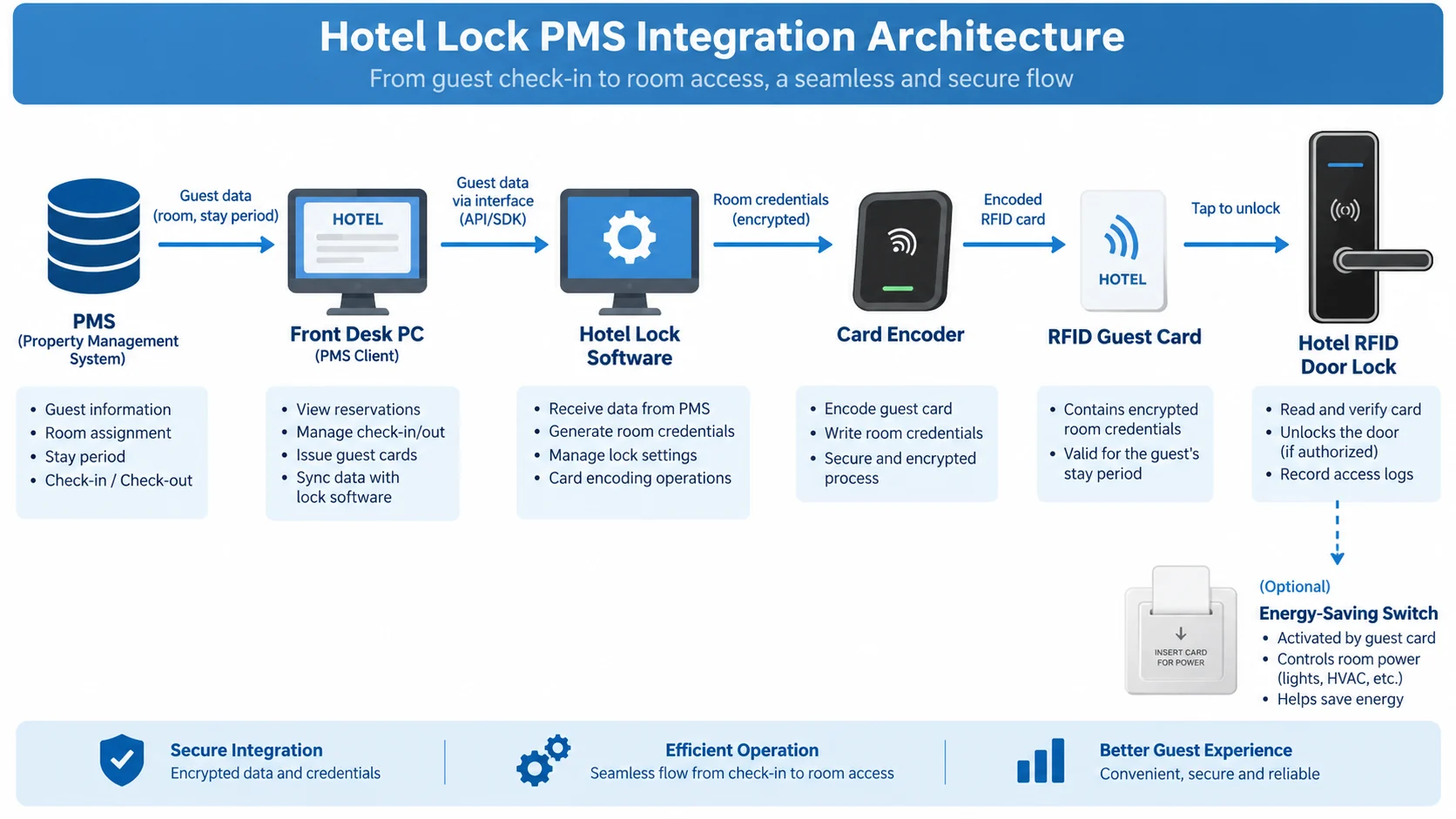
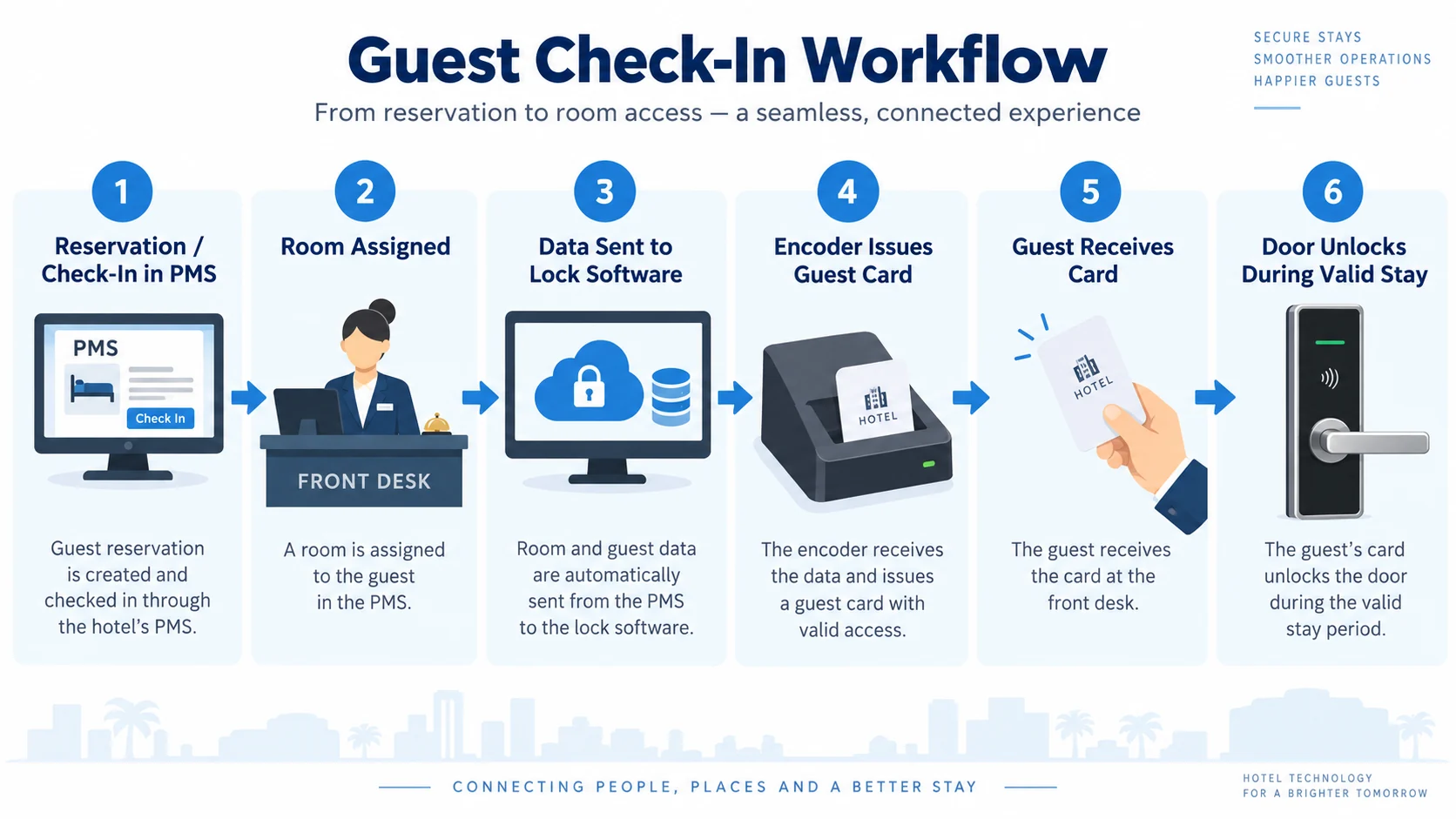
A simplified workflow is:
- The front desk creates or updates the guest reservation in the PMS.
- The PMS sends the required room and stay information through the agreed interface.
- The lock software receives the information and prepares the room-access credential.
- The encoder writes the access data to the guest card, or the system creates the required PIN or mobile credential where supported.
- The guest uses the credential to access the assigned room during the valid stay period.
The PMS does not normally communicate directly with the physical lock on the door. In most projects, the PMS communicates with the lock management software or a middleware/interface layer, and the lock software manages the actual access credential.
What Interface Functions Are Needed?
The required interface functions depend on the hotel workflow and the PMS provider. Common functions may include:
- Guest check-in and room assignment.
- Guest check-out and credential expiration.
- Room change or extension of stay.
- Card issuance and re-issuance.
- Loss or cancellation of guest cards.
- Staff or master-card management where supported by the integration scope.
SmartLockMarket can provide hotel lock interface-function documentation or the relevant interface package for technical review. The hotel’s PMS supplier or IT team should review the interface documentation and confirm whether their PMS can complete the required integration.
This technical confirmation should be completed before the project is finalized. A lock supplier can provide the available interface functions, but the PMS provider normally needs to confirm whether their system can connect to them.
Beyond the business functions listed above, the technical interface method must also be confirmed. Common interface approaches include:
- REST API / Web service: A modern and widely used method in which the PMS sends structured data over HTTP or HTTPS. It suits cloud-based and on-premise PMS platforms that expose an API for third-party systems.
- SDK / library integration: The lock system provides a software development kit that the PMS provider integrates into their own application. This is often chosen when a closer or more custom connection is required.
- Middleware / interface gateway: A separate application sits between the PMS and the lock software and translates data when the two systems cannot connect directly.
- Database-level integration: In some legacy projects the PMS and the lock software exchange data through a shared database or file import/export. This is usually less real-time and is often a fallback option.
- Serial or TCP connection: Older lock systems or specific on-premise setups may use serial (RS232/RS485) or TCP socket communication instead of an API.
The right method depends on the PMS platform, whether the deployment is cloud-based or on-premise, and how real-time the front-desk workflow needs to be. The lock supplier can confirm which methods their system supports, while the PMS provider confirms which method their platform can implement.
What the Hotel IT Team Should Confirm
Before integration work begins, the hotel IT team, system integrator, or PMS supplier should confirm the following:
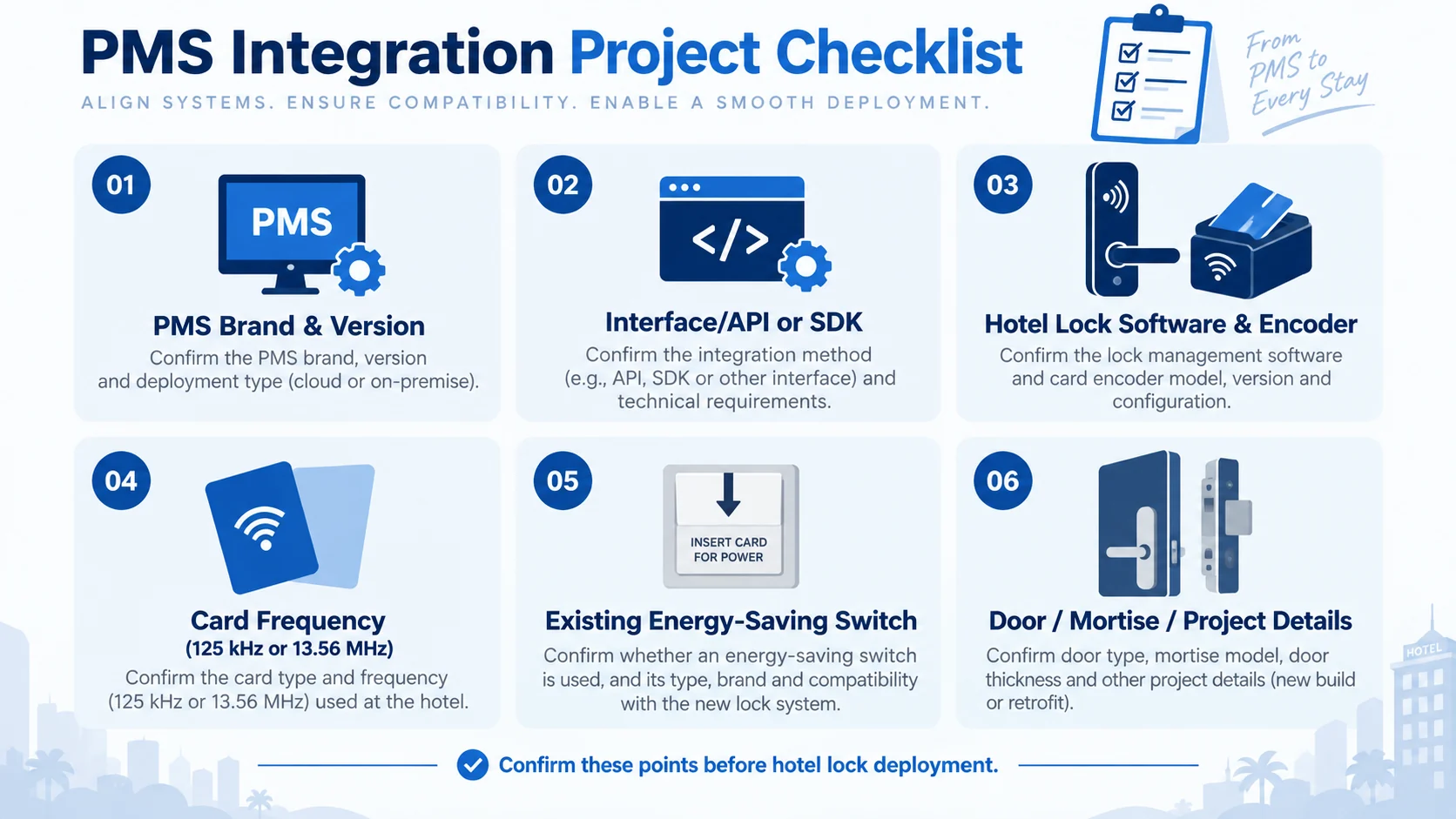
- PMS brand and version: Different versions of the same PMS may support different interface methods.
- Integration method: Confirm whether the PMS uses API, SDK, interface functions, middleware, or another supported method.
- Operating environment: Confirm the operating system, local-server requirements, database environment, and network restrictions where relevant.
- Front-desk workflow: Define how check-in, room change, card replacement, stay extension, and check-out should operate.
- Number of rooms and workstations: This can affect software deployment and front-desk configuration.
- Card technology: Confirm whether the project uses 125 kHz or 13.56 MHz cards and whether existing energy-saving switches or other systems must use the same card.
- Existing systems: For retrofit projects, confirm whether the new lock system must work with existing encoders, switches, cards, or third-party software.
For card-frequency selection, see our guide: 125 kHz vs 13.56 MHz Hotel Key Cards.
New Hotel Projects vs. Retrofit Projects
New Hotel Projects
New hotel projects usually allow the lock system, PMS workflow, card technology, encoder, and energy-saving switch to be planned together. This makes integration easier because the system architecture can be confirmed before installation.
For new projects, the supplier should receive the project requirements early, including room quantity, door type, mortise requirements, card technology, PMS information, and expected opening date.
Retrofit and Replacement Projects
Replacement projects require additional checks because the hotel may already have existing locks, mortises, software, cards, encoders, and energy-saving switches.
Before replacing the locks, confirm:
- Existing mortise and lock-body dimensions.
- Backset and center distance.
- Door thickness and opening direction.
- Existing RFID card frequency.
- Whether existing energy-saving switches must continue to use the same guest card.
- Whether existing PMS integration needs to be retained or rebuilt.
These details reduce installation risk and help determine whether the project needs a direct replacement model, a new mortise, or additional door modification.
What If Direct PMS Integration Is Not Possible?
Not every PMS can connect directly with every hotel lock system. If the PMS provider cannot support the available interface functions, the hotel may still be able to operate the lock system independently.
In this case, the front desk uses the hotel lock management software and card encoder separately from the PMS. Guest information is entered into the PMS for hotel operations, while room-access cards are issued through the lock software.
This is less automated than direct PMS integration, but it can still be practical for smaller hotels, independent properties, serviced apartments, or projects where the PMS does not support third-party lock integration.
The right solution depends on project size, front-desk workflow, existing IT systems, and the level of automation required.
What to Confirm with the Lock Supplier Before Ordering
For a B2B hotel lock project, the lock supplier should be able to confirm more than the lock model itself. Before ordering, ask for the following:
- Lock model and finish options.
- Mortise and door-thickness compatibility.
- RFID card frequency and card type.
- Hotel lock software and encoder configuration.
- Available PMS interface functions or technical documentation.
- Energy-saving switch compatibility.
- OEM logo and packaging options.
- Sample availability and project-order terms.
- Technical support for installation and software setup.
If your project requires keypad access in addition to hotel RFID cards, you can also review our Hotel Keypad Locks.
FAQ
Can every hotel PMS connect directly with the lock system?
No. Compatibility depends on the PMS platform, software version, available interface method, and the hotel lock system. The PMS supplier or hotel IT team should review the available interface documentation before integration is confirmed.
Can SmartLockMarket provide PMS interface documentation?
Yes. For supported hotel lock systems, interface-function documentation or the relevant integration package can be provided for technical review. The PMS technical team should then confirm whether they can complete the connection.
Does PMS integration change the hotel door lock hardware?
Usually no. PMS integration mainly concerns the software and front-desk workflow. However, the project still needs compatible locks, encoders, cards, mortises, and other hardware components.
Can one RFID card be used for both the hotel room and the energy-saving switch?
Yes, if the systems use compatible card technology and frequency. Existing hotels should confirm the frequency of installed energy-saving switches before selecting the new lock system.
What information should we send for a PMS integration evaluation?
Please provide the PMS brand and version, hotel room quantity, existing or planned lock system, card frequency, current front-desk workflow, and any available PMS technical documentation. This allows the integration requirements to be reviewed more efficiently.
Need Help with a Hotel Lock Project?
If you are planning a hotel, resort, serviced-apartment, or hotel-renovation project, SmartLockMarket can help you evaluate the lock hardware, software, card system, encoder, mortise compatibility, and PMS integration requirements.
Contact SmartLockMarket with your project details, PMS information, room quantity, and door requirements for a project-based recommendation and quotation.